Themes
Change the colours of Parallax.
Parallax is a dark app, and you can pick the accent and the shade of dark that you like best. There are sixteen themes in three groups.
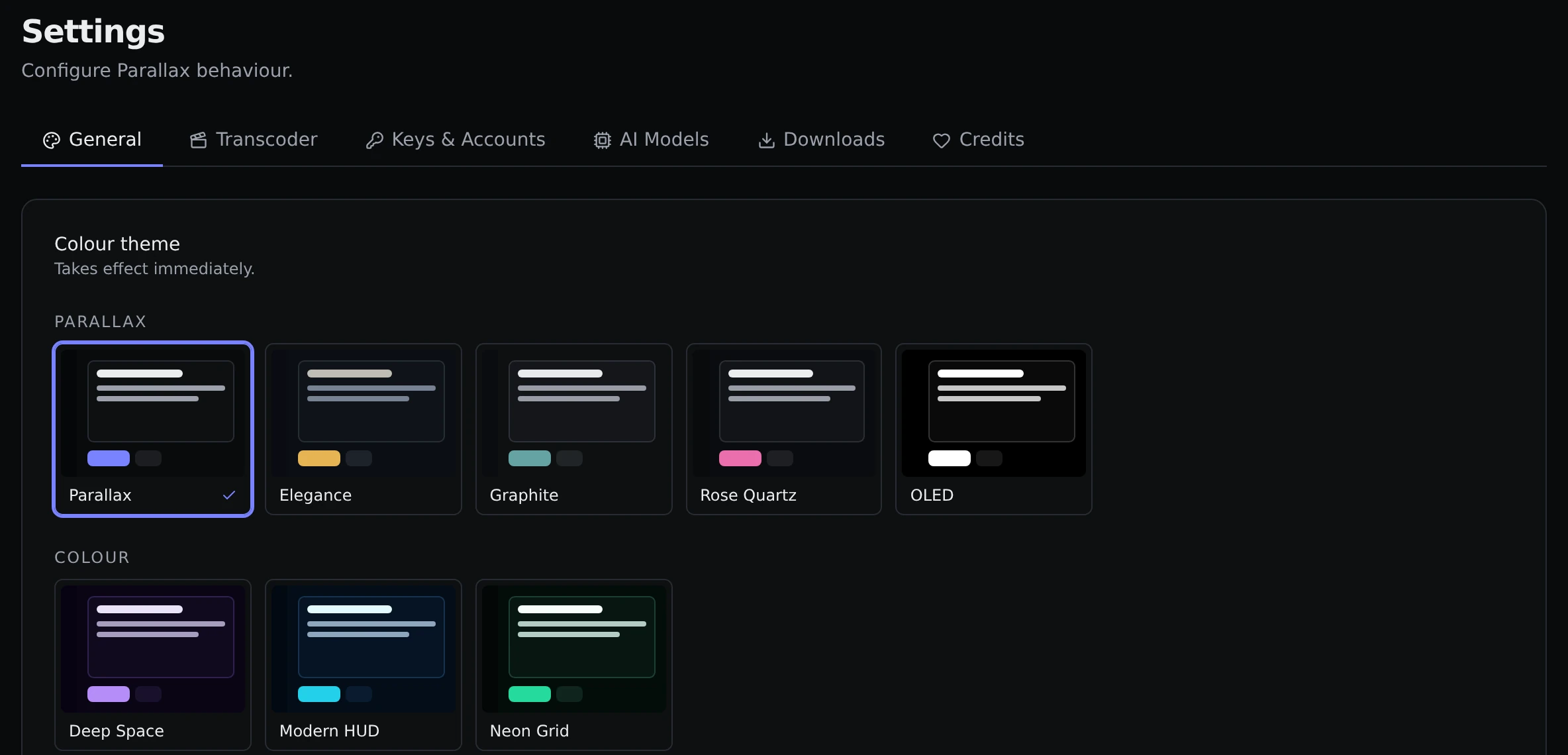
Changing theme
Open Settings → General. The Colour theme card shows every theme as a small preview. Click one and it takes effect straight away.
You can also switch from the command palette by searching for a theme's name, which is quicker if you want to try a few.
The theme is saved in Parallax itself, not in your browser. Every device you open Parallax on gets the same one, and there is no flash of a different colour when the page loads.
The themes
Parallax set. Neutral dark greys where only the accent changes.
- Parallax is the default. Very dark, with a strong indigo accent.
- Elegance has a warm gold accent on a deep blue-grey background.
- Graphite is a neutral grey with a soft teal accent.
- Rose Quartz is near-black with a pink accent.
- OLED is pure black with a white accent, for screens where black saves power.
Colour set. The background itself is tinted.
- Deep Space is purple.
- Modern HUD is cyan.
- Neon Grid is green.
Classic palettes. Well-known colour schemes from code editors.
- Catppuccin Mocha, Dracula, Nord, Tokyo Night, Gruvbox Dark, Solarized Dark, One Dark and Rose Pine.
There is no light mode.